TrustWallet - Installation Guide
The most secure crypto wallet for your digital assets
Please download the app only from official app stores (Google Play Store/Apple App Store) to ensure you're using the verified official version. Avoid downloading from unofficial sources to prevent potential asset loss.
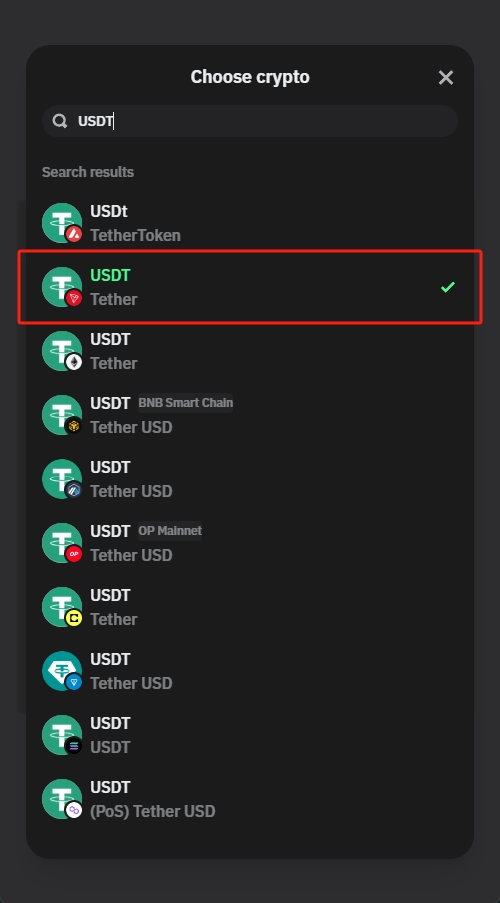
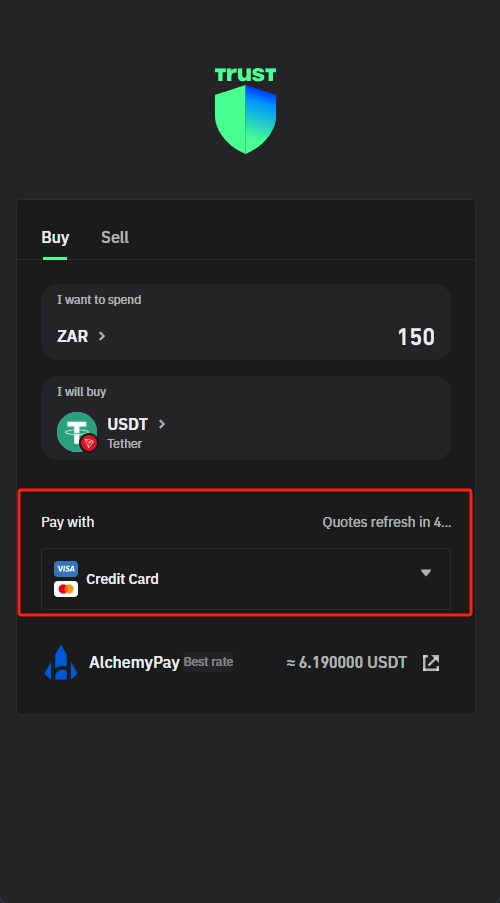
1. For first-time purchases, we recommend starting with a small amount to confirm the process before making larger transactions
2. When buying USDT, ensure your payment method is linked and verified
3. Do not close the app or switch pages during the transaction to avoid interruptions
4. After purchase, USDT typically arrives within 5-30 minutes, please be patient
1. Before withdrawing, confirm your receiving address is correct, as incorrect addresses may result in permanent asset loss
2. Select the correct network type, as different networks have varying fees and processing times
3. Large withdrawals may require additional security verification, please follow the app prompts
4. During network congestion, withdrawals may be delayed. Please be patient or choose to pay higher fees to expedite
Deposit to EasyWin Tutorial
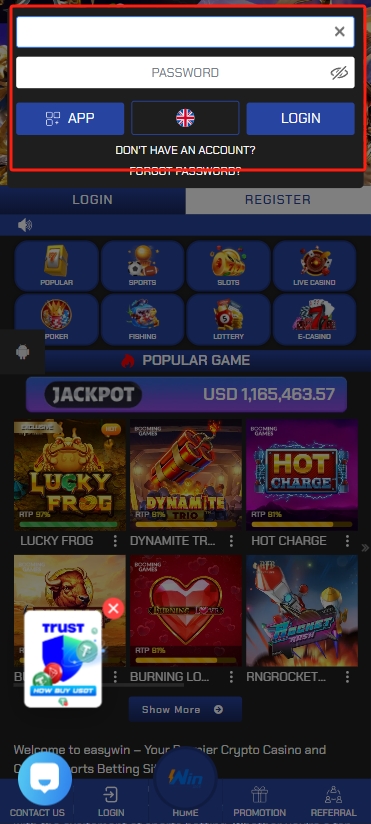
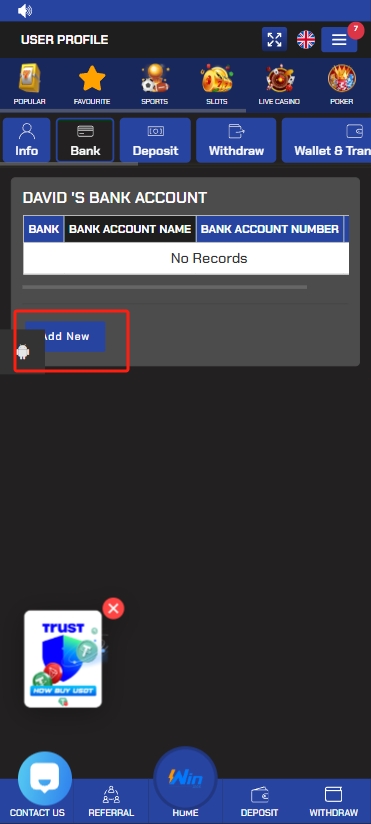
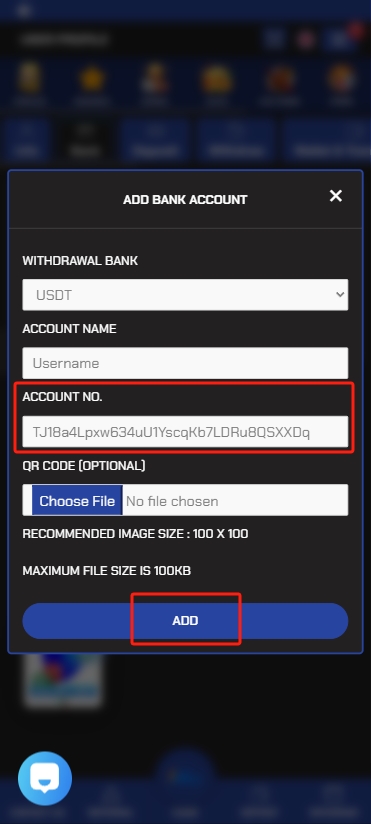
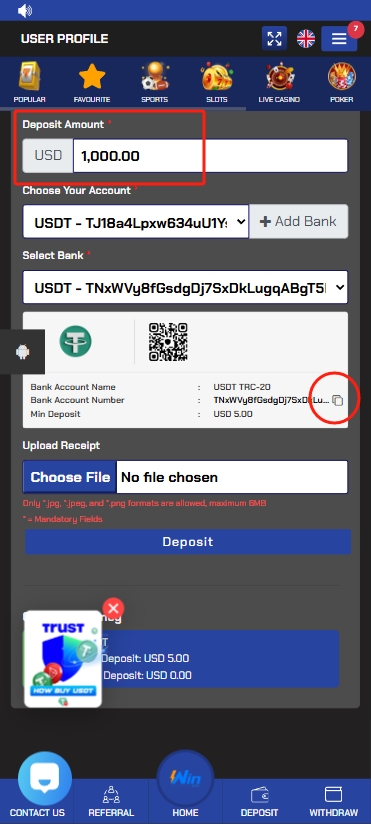
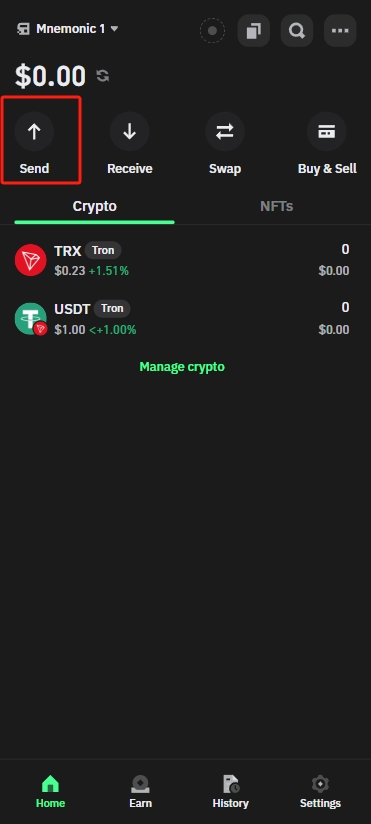
Step 1: Log in to your EasyWin account
1. Open the EasyWin website or app
2. Enter your username and password
3. Click the login button to access your account
Step 2: Get your EasyWin deposit address
1. Find the "Wallet" or "Deposit" option in your EasyWin account
2. Add your USDT address and account name to the bank list
3. Select USDT deposit method
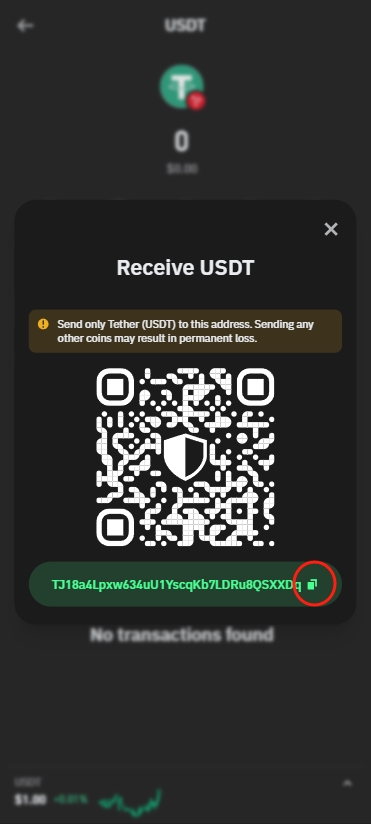
4. The system will display the USDT deposit address or QR code
5. Click the copy button to copy the address to clipboard or scan the QR code
6. Confirm you've selected the correct network type (only TRC20 network is supported)
Step 3: Transfer from TrustWallet to EasyWin
1. Open the TrustWallet app and log in to your account
2. Go to the "Assets" page and find USDT
3. Click the "Send" button
4. Paste the EasyWin deposit address you copied earlier in the recipient address field
5. Enter the USDT amount you wish to transfer
6. Confirm the transfer information and submit
7. Complete the security verification if required (such as KYC)
Important Notes:
• Make sure the network type is consistent, typically using TRC20 network for lower fees
• For your first transfer, we recommend testing with a small amount (e.g., 10 USDT) before making larger transfers
• After the transfer is complete, funds typically arrive in your EasyWin account within 1-5 minutes
• During network congestion, arrival times may be extended
• After a successful transfer, please check your EasyWin account to confirm receipt
• If your transfer hasn't arrived after an extended period, please contact TrustWallet customer service or EasyWin customer service
Frequently Asked Questions
1. Check if your device has sufficient storage space
2. Ensure your device's system version meets the app requirements
3. If you still can't install, try restarting your device and installing again
1. Confirm you've selected the correct network type, EasyWin only supports TRC20 network
2. Check if the recipient address you entered is accurate
3. The blockchain network may be congested, please wait patiently for 1-2 hours
4. Check the transaction hash (TXID) to confirm the transaction status
5. If it hasn't arrived after an extended period, please contact customer service and provide the transaction hash
1. Find the "Profile Center" or "Identity Verification" option in the app
2. Prepare your valid ID document (ID card, passport, etc.)
3. Follow the prompts to upload photos of your documents, ensuring they are clear and complete
4. Complete facial recognition verification (if required)
5. After submission, wait for review, which is typically completed within 24 hours
1. Click the "Forgot Password" option on the login page
2. Enter your login account
3. Enter your bank name (same as your login account by default, unless you've changed it)
4. Enter your USDT address for verification
5. Set a new password, we recommend using a strong password with letters, numbers, and special characters
6. Confirm your new password and submit
7. If you cannot reset your password using the above method, please contact customer service for assistance
1. Click "Customer Service" or "Help Center" in the app
2. Send an email to: support@luckyapp.com
3. Add the official Telegram customer service: @LuckyAppSupport
4. Working hours: Monday to Sunday, 9:00-21:00
5. For urgent issues, please click the "Contact Customer Service" button at the bottom of this page
The TrustWallet supports multiple payment methods, including:
1. South African Rand (ZAR) to buy USDT
2. Bank card transfers
3. Alipay
4. WeChat Pay
5. USDT deposits
6. Other cryptocurrencies (such as BTC, ETH, etc.)
Specific payment methods may vary by region, please refer to the in-app display.
Protecting your account security is very important. We recommend the following measures:
1. Enable two-factor authentication (2FA) in "Security Settings"
2. Use complex passwords that include uppercase and lowercase letters, numbers, and special characters
3. Change your password regularly, we recommend every 3 months
4. Don't save login status on public devices
5. Don't click on suspicious links or download apps from unknown sources
6. Set a transaction password that's different from your login password
7. Regularly check your account activity records and report any anomalies promptly
When transferring to EasyWin, you need to pay blockchain network fees:
1. EasyWin only supports TRC20 network transfers
2. Blockchain network fees are borne by the user
3. Fees are automatically calculated and displayed during the transfer
4. Before transferring, please ensure your account balance is sufficient to cover both the transfer amount and fees
Steps to view transaction history:
1. Log in to the TrustWallet app
2. Go to the "Assets" or "Wallet" page
3. Click "Transaction Records" or "History" option
4. You can view all deposit, withdrawal, and transfer records
5. Click on a specific transaction to view detailed information, including transaction hash, status, etc.
6. You can use the filter function to find specific records by date or transaction type
7. Transaction records are typically saved for at least 3 months; we recommend backing up important records yourself